
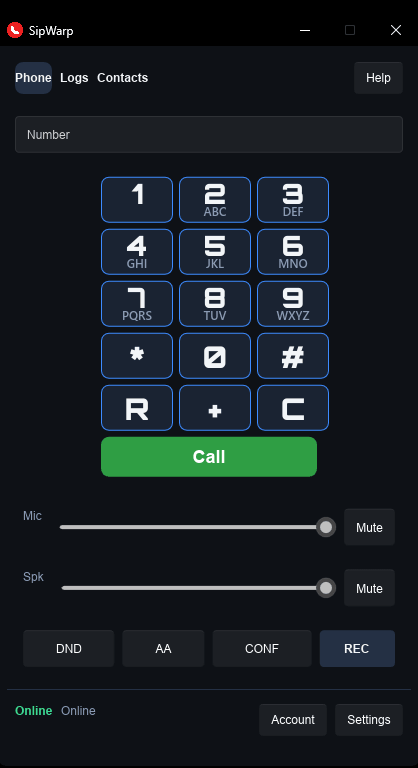
SipWarp: Windows SIP Phone
Communication at the Speed of Light
The modern desktop phone landscape is broken. Between bloated corporate software and dated, ad-heavy legacy utilities, there is simply no good, clean option left for a home user or developer who just wants a fast, reliable phone on their PC.
Corporate giants have entirely abandoned the simple concept of a "phone client." Microsoft completely dismantled Skype, leaving a legacy of clunky software in its wake. They replaced it with Microsoft Teams Phone, a dreadful ecosystem stacked with complex corporate features that cost an eye-watering $10 to $34 per user, per month on top of your base subscription. Zoom Phone followed the exact same path—bloated with collaboration tools you don't need for a simple phone call, charging $10 to $20 per month.
The standalone SIP softphone alternatives aren't much better:
- Bria Solo hides standard features behind a forced subscription model starting at $2.95 per month.
- Zoiper uses its free version to aggressively push upgrade pop-ups and teases locked features.
- Linphone is open-source but features an interface that is notoriously clunky and frustrating to navigate.
- MicroSIP is beautifully lightweight, but its Win32 UI feels locked in 2005 and—incredibly—it doesn't natively support CardDAV directory syncing.
Enter SipWarp.
I built SipWarp out of pure frustration. Named out of a deep love for classic Sci-Fi, it is designed to operate like a warp drive: exceptionally fast, ultra-efficient, and stripped of the non-essential junk that slows you down.
SipWarp is built on a high-performance, modern architecture (Rust + C + Slint) featuring a gorgeous, fluid, GPU-accelerated frontend. It is designed to sit quietly in your system tray, utilizing virtually zero system resources until a call lands.
My setup is the classic system. I use Google Voice to ring my two phones simultaneously:
- SipWarp (my desktop phone)
- My cell phone.
So if I am at my desk (about 12 hours a day, on average), I answer using SipWarp. If I am out and about, I answer on my cell phone. Most importantly, I can receive a call while I am on the phone at the desk, because I tell people to ring my Google Voice number by default, so it will ring my cell while I am on SipWarp. I love talking while on SipWarp because I can walk around talking on my wireless headphones and do things around the house while chatting.
Then a feature I wanted with SipWarp was the ability to use CardDAV (the open standard protocol used to sync and manage contacts across multiple devices). The way I setup CardDAV on SipWarp is that if you edit a contact in SipWarp, it will automatically sync to my CardDAV server (I use Radicale on my Raspberry Pi). The iPhone picks it up the next time the phone refreshes. I find it much easier to update contacts in SipWarp than on my iPhone (no offense intended).
The VoIP service I use is VoIP.ms. I will give you fair warning, their UI (once you get past the main site and begin signing up) is quite dated, and a bit cumbersome, but their service is rock solid. If you do sign up with them, after you purchase your DID (Direct Inward Dialing, the phone number assigned to you by your VoIP provider), setup a Sub Account to use with your number. Their prices are extremely reasonable. I pay for the monthly 'flat-rate' plan which, if memory serves, is $4.95/mo, an extremely reasonable price. If you want something cheaper, you can choose their 'per-minute' plan which is only $1.10/mo, and then $0.009/min. I can say that once setup was complete, VoIP.ms was well worth it and I am glad I chose them.
Core Features Implemented from Day One:
- 100% Free & Open: No subscriptions, no ads, no premium locked buttons, and no tracking. I built it for me, and am sharing it with you. I will never ask for money later on. Since I use it every day, if something breaks, I will fix it, and if a tweak is needed, I will add it.
- True CardDAV Support: Seamlessly sync your personal or self-hosted cloud address books directly to your softphone without jumping through hoops.
- Universal Contact Management: Full support for importing and exporting contacts instantly via standard .csv and .vcf formats.
- Best-in-Class Codecs Built-In: All major high-definition audio codecs are natively compiled and optimized right out of the box—no licensing upgrade prompts required. All of the needed codecs are installed and enabled by default. So when a call is received or sent, the best codec for that call is chosen, be it VoIP-to-VoIP, VoIP-to-phone, or VoIP-to-landline.
- You may choose any WAV file that you like for your ringtone and set it in the app.
- Record every call by default if you desire automatically (set in settings under devices), record individual calls, or record no calls. The choice is yours.
SipWarp is a utility built by a VoIP user, for VoIP users. It does one thing perfectly: it acts as a reliable, blazingly fast bridge between your desktop and your SIP provider.
Drop it in your tray, punch in your credentials, and warp your home phone configuration into the modern era.
Contact
If something breaks, or a call does not behave, or you would just like to say: "Hi!", send a note. A reply goes to the email you type here.